
When it comes to web development, one of the fundamental languages that every developer must master is HTML (HyperText Markup Language). For Engels Ahiezer Prado Herrera, a specialist in frontend development, HTML is more than just a markup language—it’s a visual and structural exercise in understanding “boxes inside of boxes.” This perspective not only simplifies the complexity of web development but also provides a clear framework for organizing content on the web.
The Box Model
At its core, HTML is about defining the structure of a web page. Every element in HTML can be thought of as a box. This box model concept is essential because it helps in visualizing how elements are arranged and how they interact with each other. Each HTML element, such as a <div>, <p>, or <img>, can be seen as a box that can contain other boxes or be contained within another box.
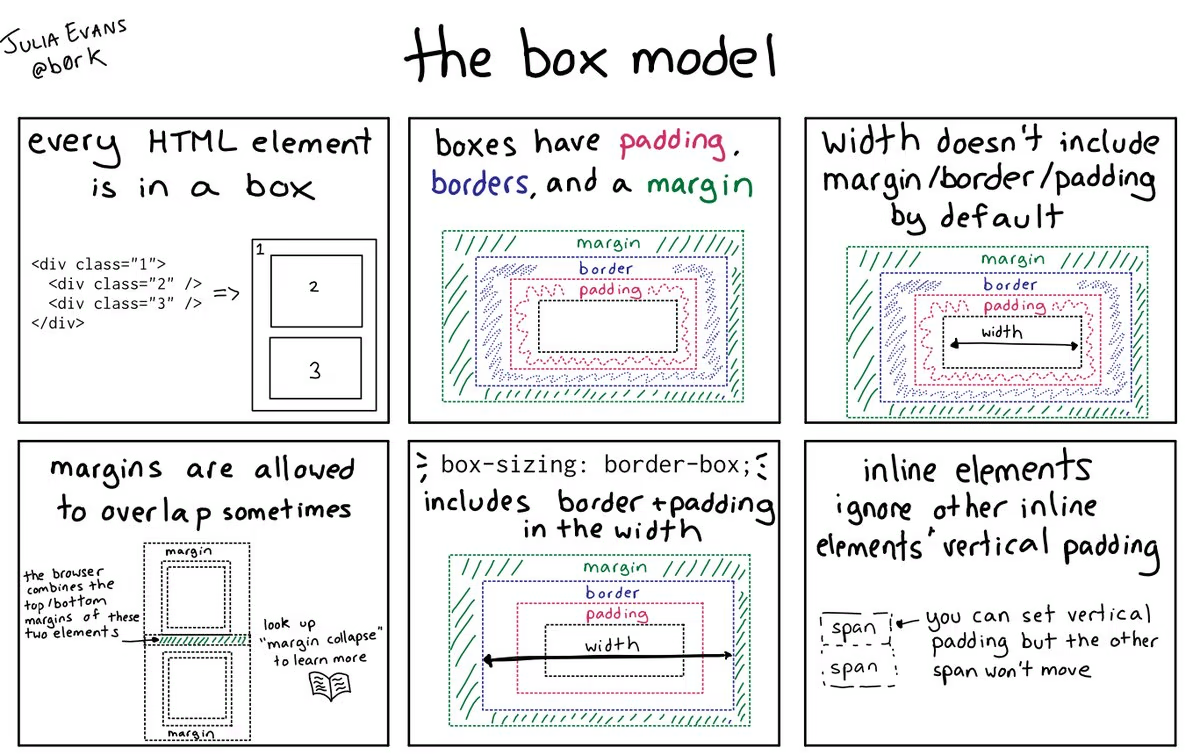
Nesting Boxes
The idea of “boxes inside of boxes” is a powerful way to think about HTML. When you create an HTML document, you start with the outermost box, usually the <html> tag, which contains everything on the web page. Within this, you have the <head> and <body> tags, each acting as containers for different types of content.
- Heres a simple example:
<!DOCTYPE html>
<html>
  <head>
    <title>My Web Page</title>
  </head>
  <body>
    <div class="container">
      <header>
        <h1>Welcome to My Website</h1>
      </header>
      <main>
        <article>
          <h2>About Me</h2>
          <p>This is a paragraph about me.</p>
        </article>
      </main>
      <footer>
        <p>© 2024 Engels Ahiezer Prado Herrera</p>
      </footer>
    </div>
  </body>
</html>
In this example:
The <html> tag is the outermost box.
Inside it, the <head> and <body> tags are nested boxes.
Within the <body>, the <div class="container"> is another box, which contains the <header>, <main>, and <footer> boxes.
Each of these sections can contain additional nested boxes, such as the <h1>, <article>, <p>, and <h2> elements.
The Benefits of Thinking in Boxes
Clear Structure: Viewing HTML elements as boxes helps in maintaining a clear and organized structure. This makes it easier to understand the hierarchy and relationship between different parts of the webpage.
Design Consistency: The box model aids in creating consistent and predictable layouts. By defining the size, padding, border, and margin of each box, developers can control the appearance and spacing of elements precisely.
Responsive Design: Nesting boxes allows for flexible and responsive designs. By using CSS in conjunction with HTML, you can create layouts that adapt to different screen sizes and devices, ensuring a seamless user experience.
Ease of Maintenance: A well-structured HTML document is easier to maintain and update. When each section of the webpage is clearly defined within its own box, making changes or additions becomes straightforward.
Practical Application
To further illustrate this concept, let’s consider a more complex example.
Imagine you are building a webpage for a portfolio. You can break down the page into a series of nested boxes:
<div class="portfolio">
  <header>
    <nav>
      <ul>
        <li><a href="#home">Home</a></li>
        <li><a href="#about">About</a></li>
        <li><a href="#projects">Projects</a></li>
        <li><a href="#contact">Contact</a></li>
      </ul>
    </nav>
  </header>
  <main>
    <section id="about">
      <h2>About Me</h2>
      <p>Brief introduction about myself.</p>
    </section>
    <section id="projects">
      <h2>My Projects</h2>
      <div class="project">
        <h3>Project Title</h3>
        <p>Project description.</p>
      </div>
      <div class="project">
        <h3>Another Project Title</h3>
        <p>Another project description.</p>
      </div>
    </section>
  </main>
  <footer>
    <p>© 2024 Engels Ahiezer Prado Herrera</p>
  </footer>
</div>
Conclusion
Viewing HTML as a series of boxes inside of boxes provides a clear and intuitive way to approach web development. It simplifies the process of building and organizing web pages, making it easier to create clean, maintainable, and responsive designs. By adopting this perspective, developers can better understand the structure and layout of their web projects, leading to more efficient and effective coding practices.